Rucking App: iPhone and Android Tracking Guide

Start with the main Rucking.Pro app

The Rucking apps let you record a loaded walk on your phone and keep the carried weight alongside the workout. Use the main Rucking.Pro app guide for the current downloads and instructions. The iPhone app is called Rucking Calorie Calculator; the Android listing is called Rucking.

This page is a practical starting guide. Choose the app for live workout tracking, or use the web calorie calculator when you already know the distance and load. A calorie result is an estimate, even when a workout includes GPS and heart-rate data.

Rucking app promotion with an iPhone preview and App Store badge
Rucking Calorie Calculator for iPhone. Android users can use the Google Play link below.

Download for iPhone · Get Rucking on Google Play · Read the main Rucking.Pro app guide

Set up a short test walk

  1. Weigh the complete backpack or vest, including the carrier, plates, water, and other items you will carry. Avoid entering only the number printed on one plate.
  2. Enter your body weight separately from your carried load. Check pounds versus kilograms before saving either value.
  3. Choose the carry type that matches the equipment you are using.
  4. Review the location and optional health permissions the app requests. Heart-rate features need a compatible data source and permission; a phone alone is not a continuous heart-rate monitor.
  5. Try Start Ruck on a familiar, short route. After stopping, check distance, elapsed time, pace, and the calorie estimate before relying on the setup for a longer outing.

A short test is also the right time to check what happens when the screen locks. The current store descriptions include background tracking, but phone settings, battery restrictions, reception, and permission choices can affect a particular session. Troubleshoot near home rather than halfway through a remote route.

Read the workout without chasing the biggest number

Distance tells you how far you traveled. Elapsed time tells you how long the session lasted. Average pace connects those two, but a long rest can make the average look slower even if your walking speed was unchanged. Record whether breaks were included when comparing outings.

The calorie estimate adds another planning measure. It does not prove that one workout burned an exact number of calories or that a heavier pack produced a better session. A comfortable repeatable walk can be more useful than a heavy session that changes your gait or leaves you unable to train again comfortably.

Use the browser calculator when distance is already known

The main calculator guide explains the web tool’s body-weight, carried-weight, distance, effort, and carry-type inputs. It does not directly take precise walking speed or measured slope. Its broad effort settings cannot fully describe every hill, trail surface, or individual response.

For a completed walk, use the actual distance rather than the planned route. For a future walk, compare reasonable options while keeping the other inputs the same. The result includes a modeled walking component and a load component; it is not all extra energy caused by wearing the vest.

Avoid duplicate workout records

Decide which app will be your main record. Apple Health and Health Connect connections are optional and depend on the platform and permissions. If another watch or app recorded the same walk, review the resulting records before adding a second copy manually. Do not add two whole-session calorie estimates together.

Keep a useful weekly record

Alongside the numbers, note the route, load, weather, stops, and how you felt during and after the walk. Compare similar sessions before changing distance, pace, or weight. If the equipment causes pain, restricts breathing, or changes your normal walking pattern, stop and reassess the setup. An app’s default load is not a starting-weight recommendation.

App links and feature references checked October 7, 2026. See the App Store listing, Google Play listing, and main calculator guide for current details.

Posted in Uncategorized | Comments Off on Rucking App: iPhone and Android Tracking Guide

Rucking Calories on Trails: Hills, Footing and Better Estimates

Trail rucking is harder to estimate than a steady walk on a level surface. A route can mix smooth track, climbing, steep descents and careful steps over rocks. Distance and pack weight still matter, but they do not describe all that work.

The practical answer is to use a calorie estimate as one planning input, then keep enough route detail to interpret it. There is no universal percentage to add just because a walk took place on a trail.

Dry trail through low vegetation with Potts Creek Trail 360 degree text
Potts Creek Trail imagery from Rucking.Pro. Check current route and weather conditions before an outing.

Climbing and descending do not cancel out

A loop may finish at its starting elevation while including substantial climbing. Net elevation change is therefore a poor description of the route. Record cumulative ascent and descent, and look at where the steep sections occur.

Laboratory research on walking slopes shows that energy cost changes differently uphill and downhill. Moderate descending can be less costly than level walking, while very steep descending increases the demand again. These findings do not provide one blanket adjustment for every loaded trail.

For planning, distinguish a gradual climb from short steep pitches with flat stretches between them. Two routes with the same distance and total ascent can feel very different, and their average grade can conceal the sections that determine your pace.

Use the calculator without pretending it measures the trail

As an illustration, a 190 lb person carrying a complete 15 lb backpack over three miles gets approximately 407 calories from the rucking calorie calculator at normal effort. Choosing its high-effort preset changes the output to about 529 calories.

Those are two calculator scenarios, not upper and lower confidence limits for that person’s trail. The tool does not directly use measured grade or a detailed surface model. Changing the effort setting is an assumption; it does not independently verify the extra work of mud, roots or climbing.

Do not add another arbitrary trail percentage on top of a preset simply to produce a larger number. If exact energy requirements matter for a long expedition or a medical reason, a recreational web estimate is not enough.

Keep moving time and elapsed time separate

A two-hour outing might include time spent eating, checking a junction or helping someone across an obstacle. Your body still uses energy during those pauses, but the period is not two hours of continuous loaded walking.

Record both times when possible. Use elapsed time to plan daylight and supplies. Use moving time, with appropriate caution, to compare the walking portions of familiar routes. Avoid comparing one workout that includes every stop with another whose timer was repeatedly paused.

What to note in a useful trail log

  • Route: distance, surface and whether it was the same loop as before.
  • Elevation: approximate ascent and descent, with any questionable GPS readings noted.
  • Load: the full backpack at departure, including water.
  • Time: moving time, elapsed time and unusually long stops.
  • Conditions: heat, rain, mud or other factors that changed the outing.
  • Response: perceived effort, foot comfort and how you recovered.

You do not need laboratory-level detail for every walk. A few consistent notes explain why a slower trail session might have been demanding even when the displayed calorie estimate changed little.

Compare the same route before comparing different trails

A repeat loop is a useful benchmark. Keep load similar and see whether movement feels steadier or you need fewer unplanned stops. An improved time is only helpful when the conditions and effort are reasonably comparable.

Field research comparing walking equations found meaningful differences among predictions even when the researchers used the same measured route inputs. A watch and a web calculator agreeing does not prove either one has measured your metabolism.

Let trail safety set the plan

Choose a route within your current ability, check local conditions and take essentials appropriate to the outing. The National Park Service’s Hike Smart guidance emphasizes preparation, watching your footing, pacing yourself and paying attention to your limits.

Reduce added training weight when footing or weather makes the route more difficult. Keep enough time and energy for the return, and turn back when conditions require it. A lower calorie total is an acceptable outcome; completing an unnecessary heavy carry is not the priority.

Compare equipment fit before buying

As an Amazon Associate we earn from qualifying purchases through product links in this article.

These equipment links are options to compare, not a claim of hands-on testing or a recommendation to add more weight. Check the current model, sizing, permitted loading, and return terms. A carrier’s capacity does not establish a suitable walking load.

Compare the CamelBak Motherlode with the equipment you already use, focusing on fit, access, and comfort rather than a calorie target.

CamelBak Motherlode
CamelBak Motherlode. Confirm the exact model and specifications at the current listing.

Compare the GORUCK Rucker 4.0 20L with the equipment you already use, focusing on fit, access, and comfort rather than a calorie target.

GORUCK Rucker 4.0 20L
GORUCK Rucker 4.0 20L. Confirm the exact model and specifications at the current listing.

Keep a useful record with Rucking.Pro

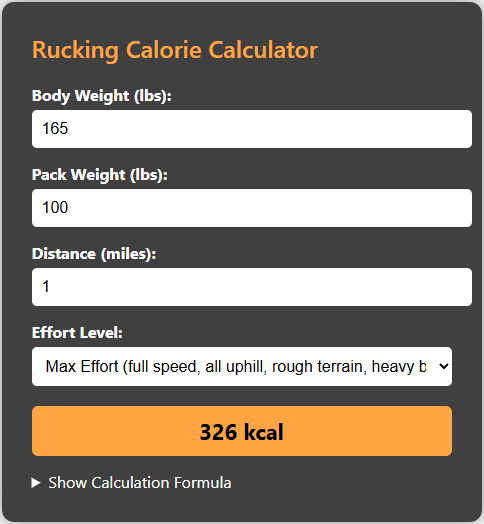
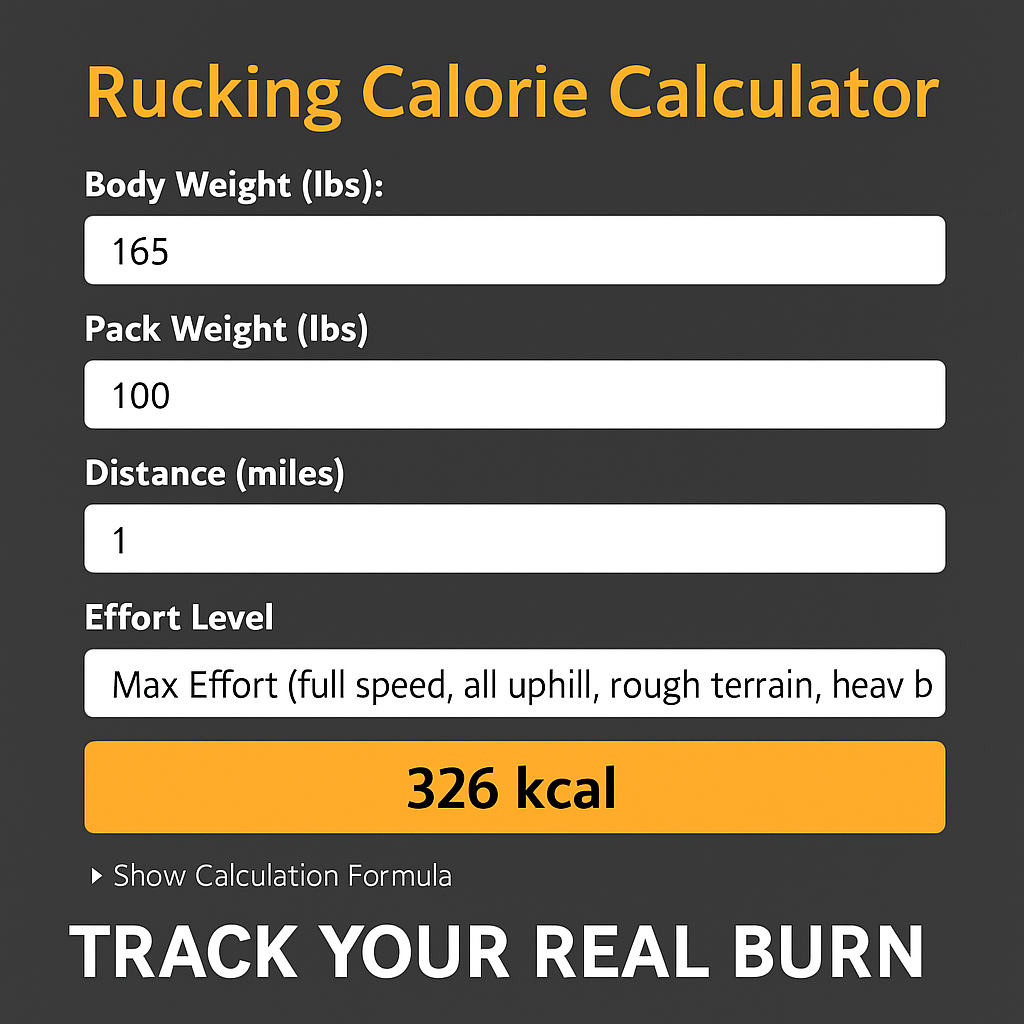
Use the main Rucking.Pro calorie calculator for a planning estimate, and keep the result labeled as an estimate. It cannot choose a safe training load or tell you what an individual session will do to your bodyweight. Record route, time, complete carried weight, and how the outing felt alongside any calorie number.

Rucking.Pro calorie calculator interface
Calculator output is an estimate, not a metabolic measurement or medical clearance.

Visit the Rucking.Pro app guide for the current phone options. Check the relevant store listing for platform features and requirements.

Rucking app promotion with an iPhone preview and App Store badge
Rucking Calorie Calculator for iPhone. The Android download is linked below.

Download for iPhone · Get Rucking on Google Play

Posted in Uncategorized | Comments Off on Rucking Calories on Trails: Hills, Footing and Better Estimates

Rucking Calculator App: Set Up and Review a Loaded Walk

Choose live tracking or a manual calculation

A rucking calculator app is useful when it keeps the weight you carry alongside the distance you walk. Begin at the main Rucking.Pro app guide for the current iPhone and Android downloads. Use live tracking while you walk, or a manual calculator when you already know the distance.

The distinction matters. A manual entry does not reconstruct a missing GPS route. A live record can preserve workout measurements, but its calorie figure remains an estimate. Neither method can tell you exactly how much energy your body used.

Prepare the inputs before starting

  1. Enter actual body weight separately from equipment weight.
  2. Weigh the whole vest or loaded backpack, including the carrier and other contents.
  3. Choose vest or backpack to match the setup.
  4. Check the units and the effort option before beginning.
  5. Use a short familiar route to test tracking and saving before a long outing.

Choose your route and load from what you can currently manage. The value already showing in a form, a product’s maximum capacity, or a calorie example is not an appropriate starting-weight recommendation. A light load, or an unloaded baseline walk, may be the useful starting point.

What to record during and after the walk

Check that the workout has started. When you finish, inspect the distance and elapsed time, then note meaningful stops, terrain changes, or an equipment problem. Do not infer a training breakthrough from a GPS jump or a session that was accidentally left running.

Average pace is useful context. Dividing 60 elapsed minutes by three miles gives 20 minutes per mile. If those 60 minutes included a long break, label that convention rather than comparing the result directly with another app’s moving-time pace.

Understand the browser tool

The Rucking.Pro web calculator uses miles, body weight, carried weight, a broad effort setting, and carry type. It does not directly use exact speed, measured grade, elapsed time, or heart rate. Read the method on the main page before assuming its result includes every detail of a recorded route.

The result combines a modeled walking component and an added-load component. It is not all extra calories from the vest. Different calculator and watch totals also do not prove that either one is exact. Keep estimates labeled by their source instead of adding them together.

Make comparisons that answer a real question

If you are comparing two loads, keep the route and other settings consistent. If you are comparing routes, note terrain and time as well as distance. Changing every input at once may produce a bigger number without explaining why the session felt different.

As an Amazon Associate we earn from qualifying purchases through product links in this article.

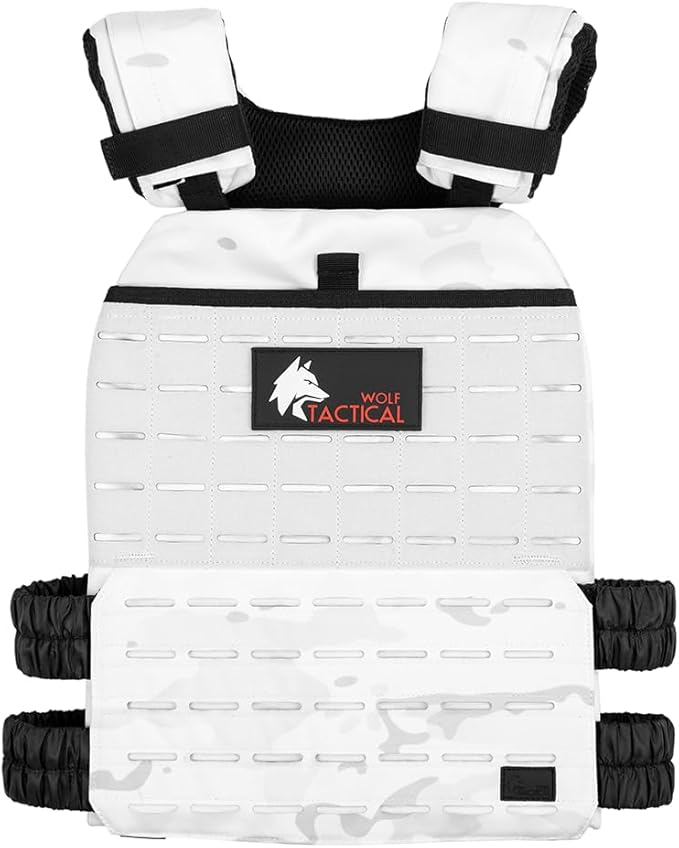
If you prefer a traditional weighted vest for comfort during longer walks consider the Wolf Tactical Adjustable Weighted Vest. It is beginner friendly, distributes load well, and works for both walking and strength work. Compare sizes before buying and read reviews.


Wolf Tactical Adjustable Weighted Vest
Wolf Tactical Adjustable Weighted Vest for comfortable rucking and progressive loading.

Also remember hydration matters on long loaded walks. If you use a rucksack or hydration pack, the CamelBak Motherlode 100oz Mil Spec Crux Hydration Backpack works well to combine fluid and weight carriage. The app can help you estimate caloric burn with different pack weights so you can plan hydration and nutrition accordingly.


CamelBak Motherlode 100oz hydration backpack
CamelBak Motherlode packs hydration and load carriage for long rucks.

Get the current app for your phone

The store listings describe GPS distance, time, pace, and estimated calories with load and carry-type settings. Apple Health and Health Connect access is optional and depends on permission and compatible data. Your phone alone does not supply continuous heart-rate measurements.

Rucking app promotion with an iPhone preview and App Store badge
Rucking Calorie Calculator for iPhone. Android users can use the Google Play link below.

Download for iPhone · Get Rucking on Google Play · Read the main Rucking.Pro app guide

Keep one primary workout record

If a watch or another app has already saved the walk, check the health record before adding another copy. Comparing calorie estimates in notes is different from logging both as separate exercise. Avoid counting an ordinary daily walk again if it is already included in your usual activity allowance.

Review the week beyond calories

Look at completed distance, consistency, comfortable pacing, and recovery. These can improve while the calculator result stays the same. If a heavier load changes your normal gait, causes pain, or restricts breathing, reduce the challenge and reassess rather than chasing a higher estimate.

The best use of a calculator is to make your assumptions visible. Keep the inputs honest, note what the formula leaves out, and use the record to choose a manageable next walk.

App links and feature references checked October 7, 2026. See the App Store listing, Google Play listing, and main calculator guide for current details.

Posted in Uncategorized | Comments Off on Rucking Calculator App: Set Up and Review a Loaded Walk

Rucking calorie deficit calculator: estimate without double-counting

A rucking calorie deficit calculator is useful only when you know what its numbers represent. Estimating energy used on a loaded walk is one calculation. Estimating your daily deficit requires a broader view of food intake and total daily energy expenditure.

Use the steps below to keep those calculations separate. The aim is a consistent planning method, not an exact prediction of how much weight a particular walk will change.

1. Understand the two estimates

A session calculator estimates the energy associated with a workout. A daily energy estimate includes resting needs, ordinary movement and other activity across the day. An estimated deficit is daily expenditure minus daily intake, provided both sides describe the same day and use compatible assumptions.

Do not subtract a meal from a workout number and call the result your daily deficit. That leaves out the rest of the day’s food and energy use. Likewise, multiplying a session estimate by seven does not establish a weekly deficit unless the remaining assumptions also hold.

2. Enter a realistic rucking session

Start with the weighted-vest and rucking calculator. Use current body weight, the complete carried load and the distance actually walked. Check units and select the appropriate carry type and effort setting.

The current web tool uses distance, weights, effort and carry type. It does not directly calculate from elapsed time, precise walking speed, measured grade or heart rate. Those limits matter when your route has frequent stops or changing terrain.

Weigh the packed equipment rather than counting only a plate. Water and the pack itself contribute to carried weight. For comparisons, use the same route and settings unless something genuinely changed. Do not select a higher effort merely to produce a larger number.

3. Check active versus total calories

Total workout calories generally include energy you would have used at rest during the workout. Active calories generally represent expenditure above that resting baseline. Devices and tools can use different definitions, so read the explanation attached to the result.

The linked web calculator does not separately estimate resting calories. Its result should not be treated as a precise active-calorie adjustment to a daily food target. If a tool’s definition is unclear, keep the workout number as a separate record rather than combining incompatible totals.

4. Choose one consistent accounting approach

These two approaches describe different starting assumptions:

  • Usual-activity approach: your maintenance estimate already reflects your normal weekly exercise, including rucking. Regular rucks stay inside that estimate.
  • Separate-activity approach: your baseline excludes the exercise you add separately. Any adjustment needs to represent activity beyond that baseline, rather than including resting energy again.

Neither approach becomes accurate merely because a calculator displays a precise number. The important first check is whether your exercise is already included. Avoid combining an active lifestyle estimate with every workout added on top.

Also check imports. One ruck can appear as a watch workout, a manually entered session and a step-based adjustment. Review how your platform handles overlap before accepting all three.

5. Treat weight forecasts as scenarios

A fixed daily deficit does not guarantee a fixed rate of weight change indefinitely. NIDDK notes that energy needs change with weight loss, among other challenges to maintenance.

The NIDDK Body Weight Planner offers a separate way to explore changes in activity and intake over time. Its eligibility guidance states that it is for adults and is not intended for pregnant or breastfeeding people. It is not personal medical advice.

Do not choose a deadline first and force a food target low enough to match it. A clinician or registered dietitian can help decide whether intentional weight loss and a particular plan are appropriate for you.

6. Review the plan using more than one number

Keep notes on sessions completed, comfort, hunger and recovery. If you choose to monitor weight, use a longer-term trend alongside those observations. Change one part of the routine at a time so you can understand what became easier or harder.

Before trusting the next estimate, check: correct units, complete load, realistic distance, clear calorie definition and no duplicate workout. A transparent estimate with known limits is more useful than a precise-looking deficit built from overlapping numbers.

Compare equipment fit before buying

As an Amazon Associate we earn from qualifying purchases through product links in this article.

These equipment links are options to compare, not a claim of hands-on testing or a recommendation to add more weight. Check the current model, sizing, permitted loading, and return terms. A carrier’s capacity does not establish a suitable walking load.

Wolf Tactical Adjustable Weighted Vest
Wolf Tactical Adjustable Weighted Vest. Confirm the exact model and specifications at the current listing.

Keep a useful record with Rucking.Pro

Use the main Rucking.Pro calorie calculator for a planning estimate, and keep the result labeled as an estimate. It cannot choose a safe training load or tell you what an individual session will do to your bodyweight. Record route, time, complete carried weight, and how the outing felt alongside any calorie number.

Rucking.Pro calorie calculator interface
Calculator output is an estimate, not a metabolic measurement or medical clearance.

Visit the Rucking.Pro app guide for the current phone options. Check the relevant store listing for platform features and requirements.

Rucking app promotion with an iPhone preview and App Store badge
Rucking Calorie Calculator for iPhone. The Android download is linked below.

Download for iPhone · Get Rucking on Google Play

Posted in Uncategorized | Comments Off on Rucking calorie deficit calculator: estimate without double-counting

Rucking Calories With a 40 lb Pack: Distance, Effort and Recovery

A 40 lb ruck is a substantial load. It may be relevant to an experienced hiker or someone preparing for a defined carrying task, but it is not a default fitness prescription. Estimating the calories is useful only after you have chosen a route and load you can manage.

What the calculator estimates

For a 180 lb person carrying a complete 40 lb backpack over three miles, the rucking calorie calculator gives about 487 calories at normal effort. At those same settings, two miles gives about 325 and one mile about 162.

These numbers are derived from the tool’s published simplified formula. They do not establish your actual energy expenditure. They also do not mean that adding the pack creates 487 extra calories of activity compared with walking without it.

Keeping the calculator in Backpack mode with zero carried weight gives about 329 calories for that three-mile example. The model’s added-load contribution is therefore approximately 158 calories. This is a comparison inside one model, with every other setting held constant.

Do not confuse a distance estimate with an hourly rate

Three miles at 3 mph takes one hour. At 2 mph it takes an hour and a half. A 40 lb pack can change your pace, especially on uneven ground, so quoting a single hourly number without describing the session hides an important assumption.

Record distance and time separately. Also distinguish moving time from elapsed time: a trail outing with a long rest should not be described as continuous walking. If you want a repeatable benchmark, a short familiar loop with known distance is easier to interpret than a route with many variable stops.

Fit and full load come before the number

Forty pounds should mean the entire bag, including its contents and starting water supply. Check the pack’s stated capacity and adjustment instructions. A comfortable lighter setup may fit very differently at this weight.

Secure the contents against shifting, make sure nothing presses sharply into your back, and test your ability to turn and step up before setting off. Where the pack is designed for it, adjust the hip belt and shoulder straps together rather than tightening shoulder straps until they dig in.

HPRC explains that pack fit and weight distribution matter, including the potential for nerve compression from poorly supported shoulder loads. Numbness or tingling is a reason to stop and reassess, not proof that your shoulders need to become tougher.

Build a session around a purpose

  • Preparing for a trip: practice with the actual equipment you need, and ask whether unnecessary items can be removed.
  • Working on endurance: choose a duration you can finish with controlled movement; extending an easier walk may be preferable to heavier loading.
  • Training for a test: use the test’s requirements and qualified coaching rather than chasing the calculator’s biggest result.
  • General fitness: there is no requirement to reach 40 lb. A lighter ruck or unloaded walk can remain part of your routine.

Avoid making the first 40 lb outing your longest, steepest and fastest session at the same time. Keep a simple record of how the session affects your later activity. A walk that leaves you unable to do your normal routine is useful feedback about the total training demand.

Recovery is part of the comparison

When reviewing two sessions, look beyond which produced more estimated calories. Compare foot comfort, sleep, how normal walking feels afterward and whether you can complete other planned exercise. More load is not automatically a better training result.

The Army’s load-carriage safety guidance warns about increasing load and distance too quickly. Do not use a fixed weekly weight increase as a substitute for your recovery and current capacity.

What should you do with the final calorie estimate?

Save it as an estimate alongside the actual session details. Do not use it to prescribe a large food restriction or assume a guaranteed amount of fat loss. If you need calorie or exercise advice for a medical condition, get individual guidance. Stop for pain, altered walking or neurological symptoms rather than completing a distance goal at all costs.

Keep a useful record with Rucking.Pro

Use the main Rucking.Pro calorie calculator for a planning estimate, and keep the result labeled as an estimate. It cannot choose a safe training load or tell you what an individual session will do to your bodyweight. Record route, time, complete carried weight, and how the outing felt alongside any calorie number.

Rucking.Pro calorie calculator interface
Calculator output is an estimate, not a metabolic measurement or medical clearance.

Visit the Rucking.Pro app guide for the current phone options. Check the relevant store listing for platform features and requirements.

Rucking app promotion with an iPhone preview and App Store badge
Rucking Calorie Calculator for iPhone. The Android download is linked below.

Download for iPhone · Get Rucking on Google Play

Posted in Uncategorized | Comments Off on Rucking Calories With a 40 lb Pack: Distance, Effort and Recovery

How to avoid blisters while rucking: fit, checks and care

Reduce rubbing before it becomes a blister

A useful blister plan begins with footwear fit and an early response to discomfort. No sock, tape or lacing method guarantees a blister-free ruck. Test your setup on a short outing before trusting it over a long distance.

Before the walk

  • Check for pressure, heel movement and folded sock fabric in the footwear you will actually use.
  • Wear new shoes for short periods first. Do not make a long loaded walk their first test.
  • Pack spare socks if your feet become sweaty, plus a suitable dressing for minor skin problems.
  • Choose a route with a practical way to stop or turn back.

The NHS blister guide recommends comfortable shoes, moisture-wicking exercise socks and changing socks when needed. Fit the sock and shoe together; a thicker sock can make an already tight shoe tighter.

When a hot spot develops

Stop somewhere safe and inspect the area. Look for grit, a sock fold, wet fabric or movement inside the shoe. Adjust the cause before continuing; do not wait for a distance target if rubbing persists. Shortening the outing is often the practical decision.

If a blister has formed

NHS guidance advises keeping it clean, covering it with a soft or padded dressing and leaving the skin intact. Do not deliberately burst it or peel away skin. Avoid the footwear or equipment that caused it until it heals.

Seek prompt medical advice for signs of infection, including heat, pus or surrounding redness, or for a very painful or recurring blister. A pharmacist can advise on an appropriate dressing. This is general information, not individual wound care.

Keep a fit record

Note the footwear, socks, route, weather and where rubbing started. Change one part of the setup before the next short test so you can identify what helped. Calorie estimates have no role in deciding whether damaged skin needs rest.

Keep the record with Rucking.Pro

Use the main Rucking.Pro calorie calculator for a planning estimate. See the app guide for current phone options and requirements.

Rucking app promotion with an iPhone preview and App Store badge
Rucking Calorie Calculator for iPhone. Check the store listing for current features.

Get Rucking on Google Play

Posted in Uncategorized | Comments Off on How to avoid blisters while rucking: fit, checks and care

Rucking heart rate and calories: what the readings can tell you

Heart rate describes part of the effort

A heart-rate reading can help you compare similar walks, but beats per minute are not a direct calorie measurement. A higher reading does not by itself establish how much additional energy a pack used. It also does not prove a workout was better.

Check the measurement before interpreting it

Apple explains that wrist readings can be unreliable or occasionally unusually high or low. Follow the device maker’s fit instructions and check whether the trace has gaps or sudden jumps. If a number looks implausible, note the uncertainty rather than turning it into a calorie target.

Keep personal details current in the device used for calorie estimates. Record the workout type and whether its result means active or total calories. Different definitions can explain part of a disagreement between tools.

Compare similar sessions

  • Use the same route and complete carried weight where practical.
  • Record elapsed time, distance, weather and perceived effort.
  • Look at a pattern across comparable outings rather than one peak reading.
  • Keep sensor problems in the log instead of smoothing them into a confident result.

Know what the web tool uses

The main Rucking.Pro calculator does not take heart rate as an input. Changing the effort preset to make its result match a watch is not a calibration method. Retain both numbers as estimates if you compare them, with the assumptions written beside each.

A practical review

After a walk, ask whether the pack was comfortable and the outing repeatable, then review the route and data. Avoid increasing load just to push heart rate or the calorie display higher. Discuss personal training zones or unexplained symptoms with an appropriate health professional rather than selecting a target from this article.

Equipment references

As an Amazon Associate we earn from qualifying purchases through product links in this article.

These existing product links are options to inspect, not claims of hands-on testing or guaranteed comfort. Check the current specifications and return terms.

Compare the Wolf Tactical adjustable weighted vest with your actual fit and equipment requirements.

Front view of a white camouflage Wolf Tactical vest
Wolf Tactical adjustable weighted vest. Photo shows the pictured version; confirm the selected color, model and included components at the listing.

Keep the record with Rucking.Pro

Use the main Rucking.Pro calorie calculator for a planning estimate. See the app guide for current phone options and requirements.

Rucking app promotion with an iPhone preview and App Store badge
Rucking Calorie Calculator for iPhone. Check the store listing for current features.

Get Rucking on Google Play

Posted in Uncategorized | Comments Off on Rucking heart rate and calories: what the readings can tell you

Rucking hills training: plan the route, load and recovery

Plan the hill before adding load

A hills plan should account for the ascent, descent, footing and a safe turnaround. Steeper terrain is a separate challenge from a heavier bag. There is no universal eight-week progression that fits every route or walker.

Establish a route baseline

Inspect the route on a manageable walk before adding unfamiliar load. Note the steep sections, loose ground, exposed areas and places where turning back is awkward. Plan the return as carefully as the climb.

  • Route: choose a section you know, with a clear stopping point.
  • Setup: secure the load and record the complete pack weight.
  • Conditions: check weather, visibility and footing.
  • Exit: know how to shorten the outing if the route or your comfort changes.

Change one demand at a time

Record whether a change is a longer route, more climbing, a faster pace or greater load. Avoid adding all four at once. Army foot-march injury-prevention guidance cautions against rapid increases in load or distance. Treat that as a reason to plan progression, not as a civilian training schedule.

Review the descent and recovery

Use a pace that leaves you in control of your steps. If fatigue changes how you walk, shorten the session rather than racing the return. Note discomfort during and after the outing before planning the next demanding walk. Pain or numbness warrants stopping and reassessing.

Keep calorie estimates in perspective

The main calculator does not directly model measured slope or each climb and descent. Its effort options cannot turn a complex trail into a precise energy measurement. Record the route and elevation information separately, and do not use the displayed number to justify a harder session.

Equipment references

As an Amazon Associate we earn from qualifying purchases through product links in this article.

These existing product links are options to inspect, not claims of hands-on testing or guaranteed comfort. Check the current specifications and return terms.

Front view of a tan Wolf Tactical Simple vest
Wolf Tactical Simple weighted vest. Photo shows the pictured version; confirm the selected color, model and included components at the listing.
Front view of a black GORUCK rucking backpack
GORUCK Rucker 4.0 20L. Photo shows the pictured version; confirm the selected color, model and included components at the listing.

Keep the record with Rucking.Pro

Use the main Rucking.Pro calorie calculator for a planning estimate. See the app guide for current phone options and requirements.

Rucking app promotion with an iPhone preview and App Store badge
Rucking Calorie Calculator for iPhone. Check the store listing for current features.

Get Rucking on Google Play

Posted in Uncategorized | Comments Off on Rucking hills training: plan the route, load and recovery

Rucking calories with a 50 lb pack: a worked estimate

A 50 lb pack is an input, not a recommendation

There is no single calorie total for rucking with a 50 lb pack. Route, distance, pace and individual movement affect the real outing. A calculator can show what its model predicts, provided you label that number as an estimate.

First clarify whether 50 lb means the complete carried load or only the plate. The bag, water and other supplies add weight. Keep that definition consistent in your training log.

A worked calculator example

Using the main Rucking.Pro calculator formula, a 180 lb person walking 3 miles with a complete 50 lb load, normal effort and Backpack selected gets approximately 527 calories. The arithmetic is 3 × (180 × 0.57 + 50 × 1.23) × 1.0 × 1.07.

With the same settings and zero added load, the model returns about 329 calories. The modeled difference is approximately 197 calories. That comparison is an illustration of this formula, not a measured effect or a reason to carry 50 lb.

Why time and terrain still matter

This distance-based calculation does not directly use elapsed time, exact speed or measured slope. If a heavy pack makes you stop frequently or shorten the walk, the example may describe very little about your actual outing. Do not substitute it for a food requirement or a promised weight-loss result.

Review suitability before chasing expenditure

Army guidance on foot-march injuries identifies rapid load or distance progression as a risk. Someone able to move a weight briefly is not necessarily prepared to carry it for a long route. Use appropriate individual guidance when planning demanding loaded walks.

  • Weigh the whole setup.
  • Check pack instructions and fit.
  • Choose a route with a manageable return.
  • Record comfort and recovery alongside any estimate.

Equipment references

As an Amazon Associate we earn from qualifying purchases through product links in this article.

These existing product links are options to inspect, not claims of hands-on testing or guaranteed comfort. Check the current specifications and return terms.

Compare the GORUCK Rucker 4.0 20L with your actual fit and equipment requirements.

Front view of a black GORUCK rucking backpack
GORUCK Rucker 4.0 20L. Photo shows the pictured version; confirm the selected color, model and included components at the listing.

Keep the record with Rucking.Pro

Use the main Rucking.Pro calorie calculator for a planning estimate. See the app guide for current phone options and requirements.

Rucking app promotion with an iPhone preview and App Store badge
Rucking Calorie Calculator for iPhone. Check the store listing for current features.

Get Rucking on Google Play

Posted in Uncategorized | Comments Off on Rucking calories with a 50 lb pack: a worked estimate

Rucking for weight loss: a realistic beginner planning approach

Build a manageable routine before a weight-loss forecast

A beginner rucking plan should start with current walking ability and a setup you can evaluate. A fixed eight-week load progression cannot promise steady fat loss or a joint-safe route to it.

Choose process goals

  • Plan a familiar walk with a clear turnaround.
  • Check pack fit and complete carried weight.
  • Record actual time, distance and comfort.
  • Review recovery before changing the next outing.

An eight-week walking-plan organizer

If you came looking for an eight-week walking plan for weight loss, use the calendar to organize a walking habit, not to predict pounds lost. The organizer below can be used without a pack. It is an editorial planning worksheet, not an NHS program or an individualized exercise prescription.

The NHS advises starting small, planning when and where activity fits, and tracking progress. Its walking guidance also recommends gradually increasing distance if you are not very active. Those principles support flexible planning rather than compulsory weekly load increases.

Week Planning task Write down
1 Choose a manageable, familiar walk and a convenient time to try it. Actual minutes, route and how it felt.
2 Repeat the manageable option and see whether the planned time fits real life. Which days worked and what got in the way.
3 Choose a shorter backup route or indoor option for disrupted days. Your regular and backup choices.
4 Review the first month before changing anything. Sessions completed and any recurring discomfort or scheduling problem.
5 If the routine is manageable, consider one practical adjustment; repeating it is also an option. The one change, if any, and why you chose it.
6 Check whether that adjustment still fits alongside work and other activity. Keep, simplify or return to the earlier routine.
7 Plan how to maintain the habit beyond this calendar. A recurring time and a realistic fallback.
8 Review consistency and decide what to continue. The routine you can sustain, not a required scale result.

No row requires added weight, a particular pace or a fixed increase in minutes. Do not make up missed sessions with a suddenly longer or heavier outing. If a health condition or symptoms affect what you can do, get individualized guidance rather than treating this worksheet as clearance to exercise. Record loaded walks separately from unweighted ones so a change in equipment does not disappear from your log.

Keep food and activity in the wider picture

NIDDK describes healthy eating and regular activity as parts of weight management. A ruck does not guarantee a calorie deficit, and its estimated calories should not automatically become an extra food allowance.

Make progression conditional

Repeat a manageable session or adjust a specific problem rather than increasing load on a preset date. Consider other exercise and physical work when planning the week. If pain, numbness or persistent discomfort occurs, pause and reassess.

Use estimates with clear limits

Keep the calculator’s assumptions with the result. Do not promise a particular weight trend from multiplying one session estimate across a week. A clinician or registered dietitian can help determine whether a weight-management goal and plan are appropriate.

A consistent walking habit, a comfortable setup and better planning remain useful outcomes even when a scale or calculator does not move as expected.

Equipment references

As an Amazon Associate we earn from qualifying purchases. Other marked product links may also be affiliate links.

Check fit, intended use and current specifications before buying. These references are not claims of personal testing or guarantees of comfort.

Compare the Wolf Tactical Simple weighted vest with the requirements you actually have.

Front view of a tan Wolf Tactical Simple vest
Wolf Tactical Simple weighted vest. The photo shows the pictured version; confirm current color, selected model and included components at the listing.

Compare the CamelBak Motherlode hydration pack with the requirements you actually have.

Tan CamelBak backpack with hydration tube and front pockets
CamelBak Motherlode hydration pack. The photo shows the pictured version; confirm current color, selected model and included components at the listing.

Current Rucking.Pro tools

Use the main calorie calculator for a planning estimate and the app guide for current phone options. Estimates cannot choose a safe load or predict an individual outcome.

Rucking app promotion with an iPhone preview and App Store badge
Rucking Calorie Calculator for iPhone. Check the store for current features and requirements.

Get Rucking on Google Play

Posted in Uncategorized | Comments Off on Rucking for weight loss: a realistic beginner planning approach